
Emailsherlock
home / free tools / chrome extension

Collect every email address you visit. Export when ready.

Emailsherlock runs quietly while you browse. Every email address on every page is captured, deduplicated, and tagged with its source. Ready to export as CSV or JSON whenever you are.
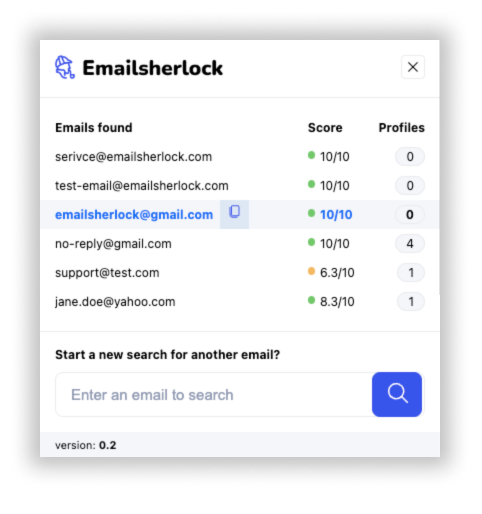
Emailsherlock Chrome extension popup, listing addresses found on the current page with deliverability score and matching profile count.
extension popup · live
what it does

A quiet email harvester with a clean export.

Runs silently in the background

The extension scans every page you visit for email addresses. No clicks, no popups, no noise. Your browsing stays exactly the same.

Deduplicated and source-tagged

Every address is saved once, with the URL where it was first seen and a timestamp. Visit the same team page ten times: six unique addresses, not sixty.

Export as CSV, JSON, or clipboard

Open the panel, filter by date range or source domain, export. Plays nicely with any CRM, any cold-outreach tool, any spreadsheet.

how it works

Install once. Forget it. Export when ready.

three steps
  • 01
    Install from the Chrome Web Store.

    No account, no configuration. The extension icon appears with a counter that ticks up as you browse.

  • 02
    Browse the web as usual.

    Team pages, directories, conference attendee lists, search results: any address found on the page gets captured.

  • 03
    Open the panel. Filter, review, export.

    Sort by date or source. Remove rows you do not want. Export CSV, JSON, or copy the list to your clipboard.

who uses it

Sales, research, recruiting, journalism.

Sales & outreach

Build targeted lists from company team pages, conference rosters, press releases. Export into your CRM without copy-paste.

Recruiting

Capture contacts from GitHub, portfolio pages, speaker bios, alumni directories. One export, zero typos.

Investigative research

Journalists and analysts collect sources across dozens of sites in a session. The extension keeps the provenance of every address.

List cleaning

Import an old list, walk through the source sites, let the extension flag what is still live on the web today.

privacy & permissions

Local by default. Synced when you sign in.

The extension reads visible text on the pages you visit and extracts email-shaped strings. Signed out, the list stays in your browser local storage. Each address is sent to our API once for scoring (deliverability, host reputation, matching profile count) and the score comes back into the local list.

Sign in with your Emailsherlock account and the list syncs to that account so you can pick it up on another device. Stay signed out and the list never leaves your browser. Either way, no page content, no form data, and no browsing history go anywhere.

activeTab page you are currently viewing
required to scan
host access sites you visit (allow-list optional)
you control the list
storage collected addresses, locally
synced only if you sign in
api lookup found addresses scored against our database
only the address itself
reading form inputs passwords, drafts, 2FA codes
never
tracking history page views, click streams
never
faq

Things everyone asks.

01 Where are the collected addresses stored?
Two modes, your choice. Signed out, the list lives only in your browser local storage. Each address is sent to our API once for scoring (deliverability, host reputation, matching profile count) and the score comes back into the local list. Sign in with your Emailsherlock account and the list syncs to that account so you can pick it up on another device or browser. Stay signed out and nothing is ever joined to a server-side list. Clearing the extension data, or uninstalling, removes the local copy.
02 Is scraping emails from websites legal?
Collecting publicly visible information is generally lawful. Using it for cold outreach is regulated separately (GDPR in the EU, CAN-SPAM in the US, PIPEDA in Canada). You are responsible for how you use your export. We never contact anyone on your behalf.
03 Does it work on sites behind a login, like LinkedIn?
Yes. The extension scans whatever is visible to you. If you are logged in and the page shows an address, it is captured. It never uses your credentials to crawl further.
04 Can I limit it to specific sites?
Yes. The settings panel has an allow-list. Default is every site you visit, but you can restrict the extension to a list of domains if you prefer.
05 Does it look up deliverability too?
Not by default. The extension only collects what is on the page. Once exported, you can paste addresses into our verify tool or the API to get deliverability and reputation info.
06 What browsers are supported?
Chrome only, for now. Builds for the other Chromium-based browsers (Edge, Brave, Arc, Opera) and a Firefox port are on the roadmap. Tell us which one you need via the contact form. We prioritise by demand.
ship it

Start collecting in 30 seconds.

Free. No sign-up. No credit card. Uninstall in one click if you change your mind.